Story memory
How to Make a Story Bible
What a story bible is, what to put in it, how to keep it up to date, and the tools that help.

Write one sentence that says what your book is about, plan as much as you need, then write the first draft straight through without fixing it. Keep a record of your characters and facts as you go, and fix the big problems before the small ones when you revise.
AxiomStory publishes this reference. The pick reflects the criteria on this page. It is not a measured ranking of every tool.
Before you open any software, try to say your book in one sentence. A useful shape is: a person wants something, something stands in the way, and something is at stake. "A girl who can hear lies has to work for the king who lies the most" gives you a hero, a conflict and a setting.
If you can't write that sentence yet, that's fine. Write a page of notes about what excites you, then come back. The sentence will guide every later choice, from which scenes to keep to what goes on the back cover.
Length shapes the whole plan. A short novel has room for one main plot and a small cast. A long fantasy can carry several points of view and a few side plots. Look at books like yours in the same genre and note roughly how long they are. That gives you a target, and it tells you early if your idea needs to grow or shrink.
Some writers outline every scene. Others start with an ending and find the way there. Both work. Most people land in between: a list of the big turning points and a rough idea of the ending.
A simple plan has four parts: the opening situation, the event that changes it, the point of no return in the middle, and the ending. Write a few lines for each. If you want more, list your scenes on cards or in a spreadsheet so you can move them around. Tools with a corkboard or plot grid, such as Scrivener or Dabble, make that easy.
Books get finished by people who write often, not by people who wait for a perfect free weekend. Pick a time you can protect most days, even if it's short. Keep your tools simple enough that you can start within a minute. If the software takes longer to open than the session lasts, it's the wrong tool for now.
The first draft's only job is to exist. When you notice a problem, leave a note in brackets, like [check her age], and keep going. Rewriting chapter one again and again is the most common way books stall.
Write in chapters or scenes rather than one huge file. It keeps the draft easy to move around and stops long files from getting slow.
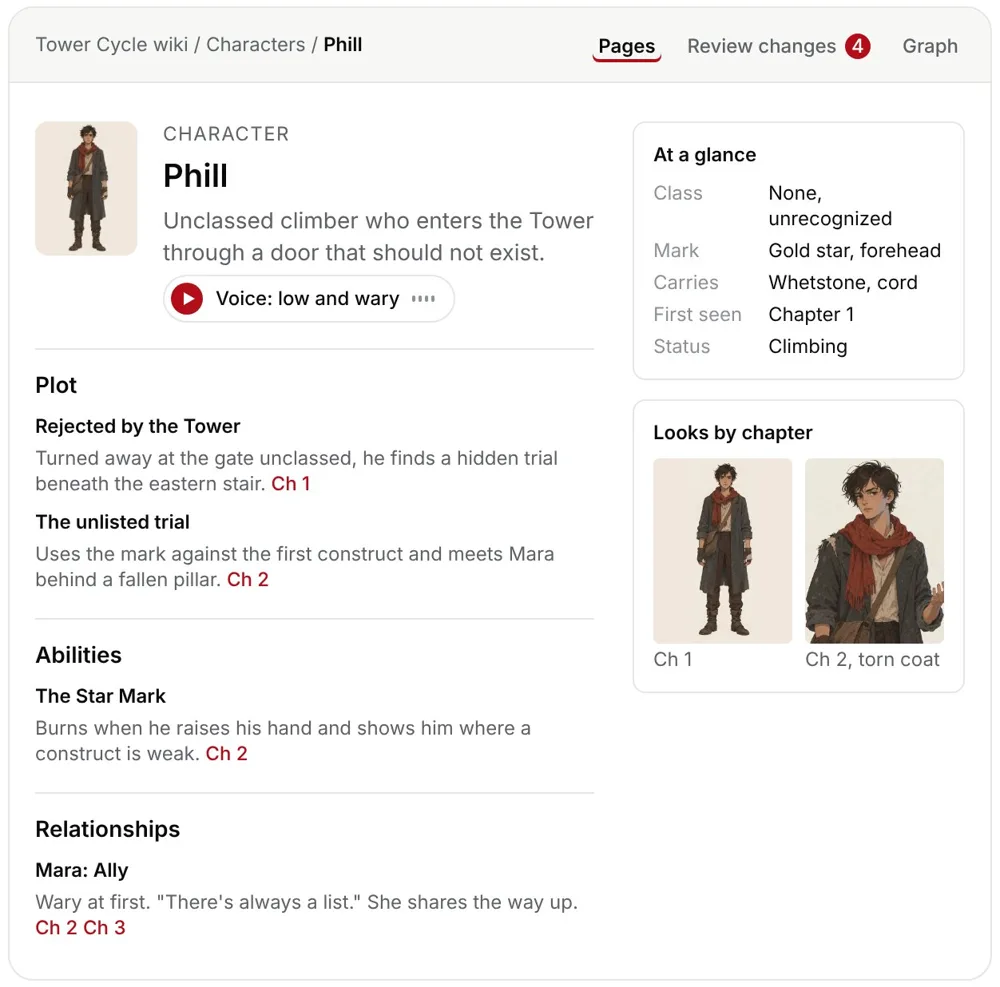
By chapter twenty you will not remember the colour of a minor character's coat in chapter three. Readers will. Keep one place with the facts that must not change: names, ages, looks, places, rules of your world and what each character knows. This is often called a story bible.
You can keep it by hand in a document or spreadsheet. Or you can use software that builds it for you. AxiomStory, which publishes this reference, reads your chapters and writes a wiki page for every character and place, with links back to the chapters each fact came from.
Fix big problems before small ones, or you'll polish sentences you later cut. A good order:
Reading your draft aloud catches more than reading it silently. So does a break of a few weeks before revising.
Beta readers tell you where they got confused or bored. Ask them specific questions, like "where did you stop wanting to read?" Fix what several readers agree on.
Format last. If you plan to self publish, a formatting tool such as Atticus or the free Reedsy Studio turns your manuscript into print and ebook files.
| Tool | Best for | AI | Pricing |
|---|---|---|---|
| Scrivener | Offline drafting and research | No | One time purchase |
| Dabble | Plotting with a grid, word count goals | Not its focus | From $15 a month billed yearly, lifetime from $699 |
| AxiomStory | Novels and series of any length: a story wiki, plot hole checks, and pictures and voices for your characters | Yes. Reads your chapters, checks continuity, and suggests edits you approve. Never writes your book unless you ask | Free to start, no card. Plans from $20 a month |
| Atticus | Formatting print books and ebooks | No | $147 one time |
| Reedsy Studio | A free browser editor with export | No | Free, paid add ons |
| Google Docs | Free drafting and sharing with readers | Some | Free |
It depends on length and how often you write. Writing a few hundred words most days gets you a full first draft in well under a year. Revising often takes as long as drafting.
Plan as much as you need to keep going. Many writers outline the big turning points and discover the details while drafting.
Any word processor works. Dedicated tools help with long books: some organise chapters and notes, some keep track of characters, and some format the final files.
Practical guides and checklists are original editorial guidance. Official descriptions don't show how tools compare in use. Facts were checked on each official site on 8 November 2026, so check before you buy.
What a story bible is, what to put in it, how to keep it up to date, and the tools that help.
The five kinds of plot hole readers notice most, how to find each one, and how to fix them without a rewrite.
A simple way to set up chapters, scenes, notes and backups so a long book stays easy to work on.
When Word is all you need to write a book, where it starts to get in the way, and what dedicated tools add.
This is one of a set of references published by AxiomStory: Best Book Writing App, Best Novel Writing App, Best Fiction Writing Software. They share the same publisher and are not independent reviews.
Best Book Writing Software. "How to Write a Book." Reviewed 8 November 2026. https://bestbookwritingsoftware.com/how-to-write-a-book/